
FaqSection Component
Complete FAQ section with tabbed categories, accordion-style questions, and smooth animations. Perfect for addressing common customer questions and reducing support load.
Overview
The FaqSection component creates an organized FAQ section with tabbed navigation, expandable accordion items, and elegant animations. It helps address customer concerns and improves conversion rates by providing instant answers.
Preview
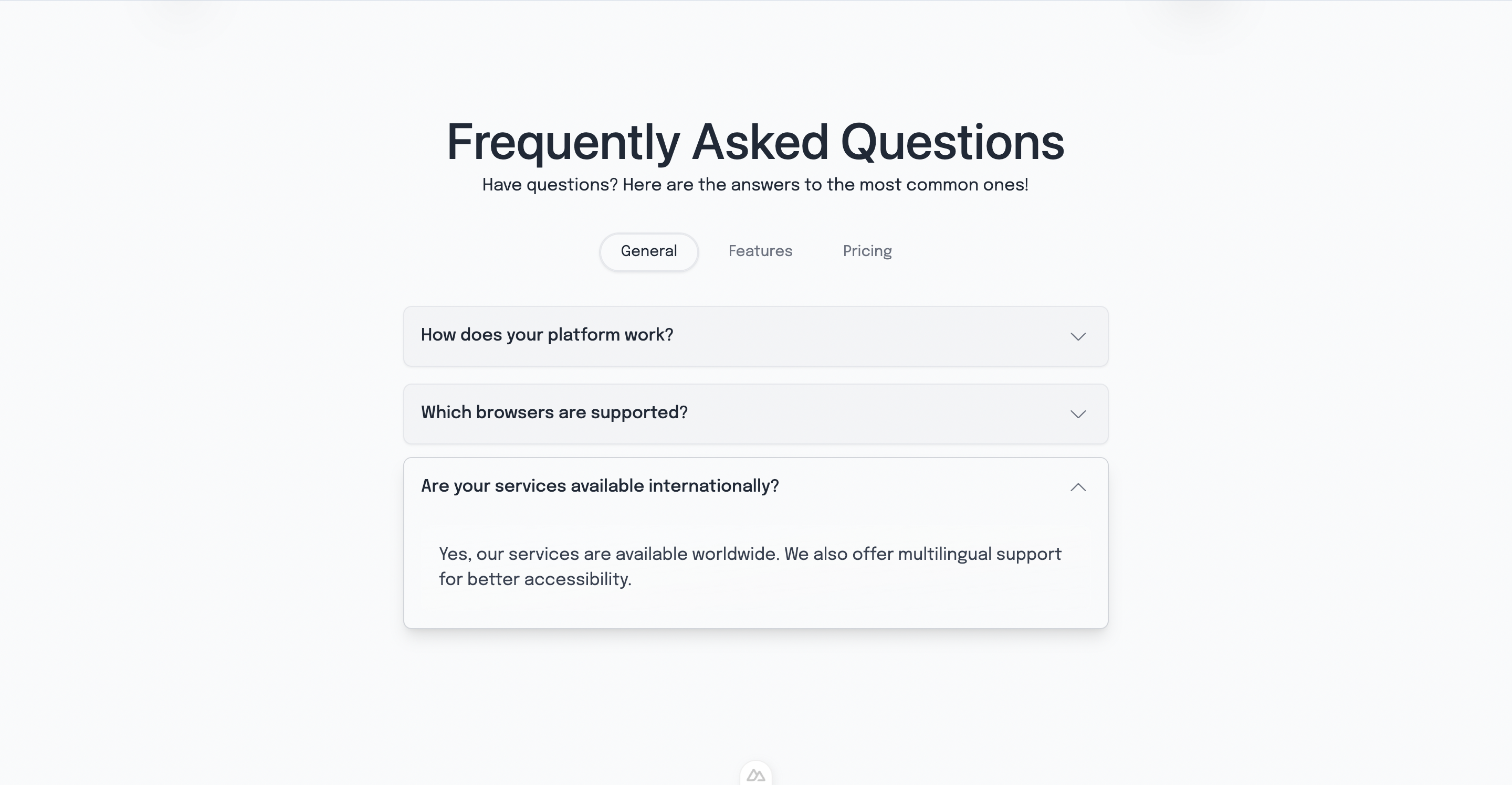
Basic Usage
vue
<template>
  <section>
    <FaqSection />
  </section>
</template>

<script setup lang="ts">
import FaqSection from '@/components/FaqSection.vue'
</script>Features
📑 Tabbed Categories
- Organized FAQ categories
- FaqTabs component integration
- Smooth tab switching
🪗 Accordion Interface
- Expandable question items
- FaqAccordionItem components
- One-at-a-time expansion
✨ Smooth Animations
- Hover lift effects
- Opacity transitions
- Shadow depth changes
- Backdrop blur effects
🌍 Internationalization
- Full i18n support
- Translatable questions and answers
- Multi-language tab labels
Component Structure
vue
<template>
  <section id="faq" class="min-h-screen flex items-center justify-center">
    <div class="max-w-3xl mx-auto">
      <!-- Section Header -->
      <h1>{{ $t('faq.title') }}</h1>
      <p>{{ $t('faq.subtitle') }}</p>

      <!-- Tab Navigation -->
      <FaqTabs v-model="activeTab" :tabs="tabs" />

      <!-- FAQ Items -->
      <div class="space-y-4">
        <FaqAccordionItem
          v-for="question in currentQuestions"
          :key="question.id"
          :question="question.question"
          :is-open="openQuestion === question.id"
          @toggle="toggleQuestion(question.id)"
        >
          <div class="answer-content">
            {{ question.answer }}
          </div>
        </FaqAccordionItem>
      </div>
    </div>
  </section>
</template>Component API
Props
This component doesn't accept props. Configuration is handled through internal data and i18n.
Events
No custom events are emitted from this component.
Data Properties
| Property | Type | Description |
|---|---|---|
activeTab | string | Currently active tab |
openQuestion | string | null | Currently open question ID |
tabs | Array | Available FAQ categories |
FAQ Data Structure
Tab Configuration
typescript
const tabs = [
  { id: 'general', label: 'General' },
  { id: 'pricing', label: 'Pricing' },
  { id: 'technical', label: 'Technical' },
  { id: 'support', label: 'Support' }
]Question Structure
typescript
interface FaqQuestion {
  id: string
  question: string
  answer: string
  category: string
}Internationalization
Configure FAQ content in your i18n files:
json
{
  "faq": {
    "title": "Frequently Asked Questions",
    "subtitle": "Find answers to common questions about ClawPlate",
    "general": {
      "q1": {
        "question": "What is ClawPlate?",
        "answer": "ClawPlate is a modern SaaS boilerplate built with Nuxt 4, Vue 3, and Supabase."
      }
    },
    "pricing": {
      "q1": {
        "question": "What's included in the price?",
        "answer": "You get full source code, documentation, and lifetime updates."
      }
    }
  }
}State Management
Active Tab Management
typescript
const activeTab = ref('general')

const currentQuestions = computed(() => {
  return faqData.value.filter(q => q.category === activeTab.value)
})Question Toggle Logic
typescript
const openQuestion = ref<string | null>(null)

const toggleQuestion = (questionId: string) => {
  openQuestion.value = openQuestion.value === questionId ? null : questionId
}Animation Details
Hover Effects
vue
<div class="transition-all duration-300 ease-out hover:-translate-y-1">- Lift effect on hover
- Smooth 300ms transition
- Ease-out timing function
Shadow Transitions
vue
:class="{
  'shadow-lg': openQuestion === question.id,
  'shadow-sm': openQuestion !== question.id
}"- Dynamic shadow depth based on state
- Larger shadow when expanded
Answer Content Animation
vue
<div class="transition-opacity duration-300 ease-out"
  :class="{
    'opacity-100 bg-gradient-to-br from-white/15 to-white/5 backdrop-blur-sm border border-white/10': isOpen,
    'opacity-0': !isOpen
  }"
>Styling Details
Section Layout
vue
<section class="min-h-screen flex items-center justify-center h-full lg:w-full w-11/12">- Full viewport height
- Centered content
- Responsive width (11/12 on mobile, full on large screens)
Typography
vue
<!-- Main title -->
<h1 class="text-gray-800 text-4xl md:text-5xl font-medium text-center mb-2">

<!-- Subtitle -->
<p class="text-center text-gray-800 mb-8">Answer Styling
vue
<div class="rounded-lg mt-2 px-4 py-4 bg-gradient-to-br from-white/15 to-white/5 backdrop-blur-sm border border-white/10">- Gradient background with transparency
- Backdrop blur effect
- Subtle border with opacity
Customization
Adding New FAQ Categories
typescript
const tabs = [
  // Existing tabs...
  { id: 'billing', label: 'Billing' },
  { id: 'integrations', label: 'Integrations' }
]Custom Animation Timing
vue
<!-- Faster animations -->
<div class="transition-all duration-200 ease-out">

<!-- Slower, more dramatic -->
<div class="transition-all duration-500 ease-in-out">Different Color Schemes
vue
<!-- Blue theme -->
<div class="bg-gradient-to-br from-blue-500/15 to-blue-500/5 border-blue-500/10">

<!-- Green theme -->
<div class="bg-gradient-to-br from-green-500/15 to-green-500/5 border-green-500/10">Child Components
FaqTabs
Handles tab navigation and switching:
vue
<FaqTabs
  v-model="activeTab"
  :tabs="tabs"
/>FaqAccordionItem
Individual expandable FAQ items:
vue
<FaqAccordionItem
  :question="question.question"
  :is-open="openQuestion === question.id"
  @toggle="toggleQuestion(question.id)"
>
  <div class="answer-content">
    {{ question.answer }}
  </div>
</FaqAccordionItem>Accessibility
Keyboard Navigation
- Tab key navigation through questions
- Enter/Space to expand/collapse
- Arrow keys for tab navigation
Screen Reader Support
vue
<section aria-labelledby="faq-title">
  <h1 id="faq-title">{{ $t('faq.title') }}</h1>

  <div role="tablist">
    <!-- Tab items -->
  </div>

  <div role="tabpanel">
    <!-- FAQ content -->
  </div>
</section>Focus Management
- Proper focus indicators
- Focus trapping within expanded items
- Logical tab order
SEO Benefits
Structured Data
Consider adding FAQ structured data:
vue
<script setup lang="ts">
const faqStructuredData = {
  "@context": "https://schema.org",
  "@type": "FAQPage",
  "mainEntity": [
    {
      "@type": "Question",
      "name": "What is ClawPlate?",
      "acceptedAnswer": {
        "@type": "Answer",
        "text": "ClawPlate is a modern SaaS boilerplate..."
      }
    }
  ]
}
</script>Anchor Links
vue
<section id="faq">
  <!-- Allows direct linking to FAQ section -->
</section>Performance Optimization
Computed Properties
typescript
const currentQuestions = computed(() => {
  // Efficient filtering based on active tab
  return faqData.value.filter(q => q.category === activeTab.value)
})Lazy Loading
Consider lazy loading FAQ data for large sets:
typescript
const { data: faqData } = await useLazyFetch('/api/faq')Integration Examples
With Search Functionality
vue
<template>
  <div class="mb-8">
    <input
      v-model="searchQuery"
      type="text"
      placeholder="Search FAQ..."
      class="w-full px-4 py-2 rounded-lg border"
    >
  </div>

  <div class="space-y-4">
    <FaqAccordionItem
      v-for="question in filteredQuestions"
      :key="question.id"
    />
  </div>
</template>With Analytics Tracking
vue
<script setup lang="ts">
const toggleQuestion = (questionId: string) => {
  const wasOpen = openQuestion.value === questionId
  openQuestion.value = wasOpen ? null : questionId

  // Track FAQ interactions
  if (!wasOpen) {
    gtag('event', 'faq_expand', {
      event_category: 'engagement',
      event_label: questionId
    })
  }
}
</script>Related Components
- Testimonials - Customer feedback section
- Features - Product features showcase
Dependencies
- FaqTabs - Tab navigation
- FaqAccordionItem - Accordion functionality
- Nuxt i18n - For internationalization
- Vue 3 - Composition API
- Tailwind CSS - For styling